How to Get Cleaner Text and More Stable Scene Edits in Nano Banana
A case-driven guide to Nano Banana text rendering and complex scene editing, built around real public examples from Google. Learn what kinds of text tasks work, how to prompt multi-image scenes, and how to avoid unstable edits.
How to Get Cleaner Text and More Stable Scene Edits in Nano Banana
Most Nano Banana articles make the same mistake: they talk about capabilities in the abstract.
That is not useful here. Text rendering and complex scene editing are exactly the two areas where vague advice breaks down fastest. You need to see what real successful cases look like, what the prompts actually asked for, and what patterns keep repeating.
The examples below all come from public Google Nano Banana examples. They show something important: Nano Banana is not just good at "making images." It is strongest when you define what text must stay readable, what structure must stay intact, and what part of the scene is allowed to change.
What This Article Is Really About
Across the examples below, the same rules keep showing up:
- short, explicit text requests are much more reliable than long copy blocks
- text works better when you also describe placement, style, and contrast
- complex edits get more stable when you separate locked elements from editable ones
- scene edits improve when you break one big transformation into smaller visual instructions
If you keep those four rules in mind, Nano Banana becomes much easier to control.
Case 1: Turn a Single Photo into a Storyboard

Source: Google, "Introducing Nano Banana Pro"
Prompt idea:
Create a storyboard for this scene.
Why this matters:
- the output is not just an image, but a structured visual document
- the model has to add readable labels, panel logic, and a consistent sketch style
- the input image anchors the subject, so the model is not inventing from scratch
Takeaway:
When you want text inside a designed layout, it helps if the layout format is already familiar: storyboard, infographic, menu, poster, label sheet, and so on.
Case 2: Make Text Part of the Scene, Not an Overlay
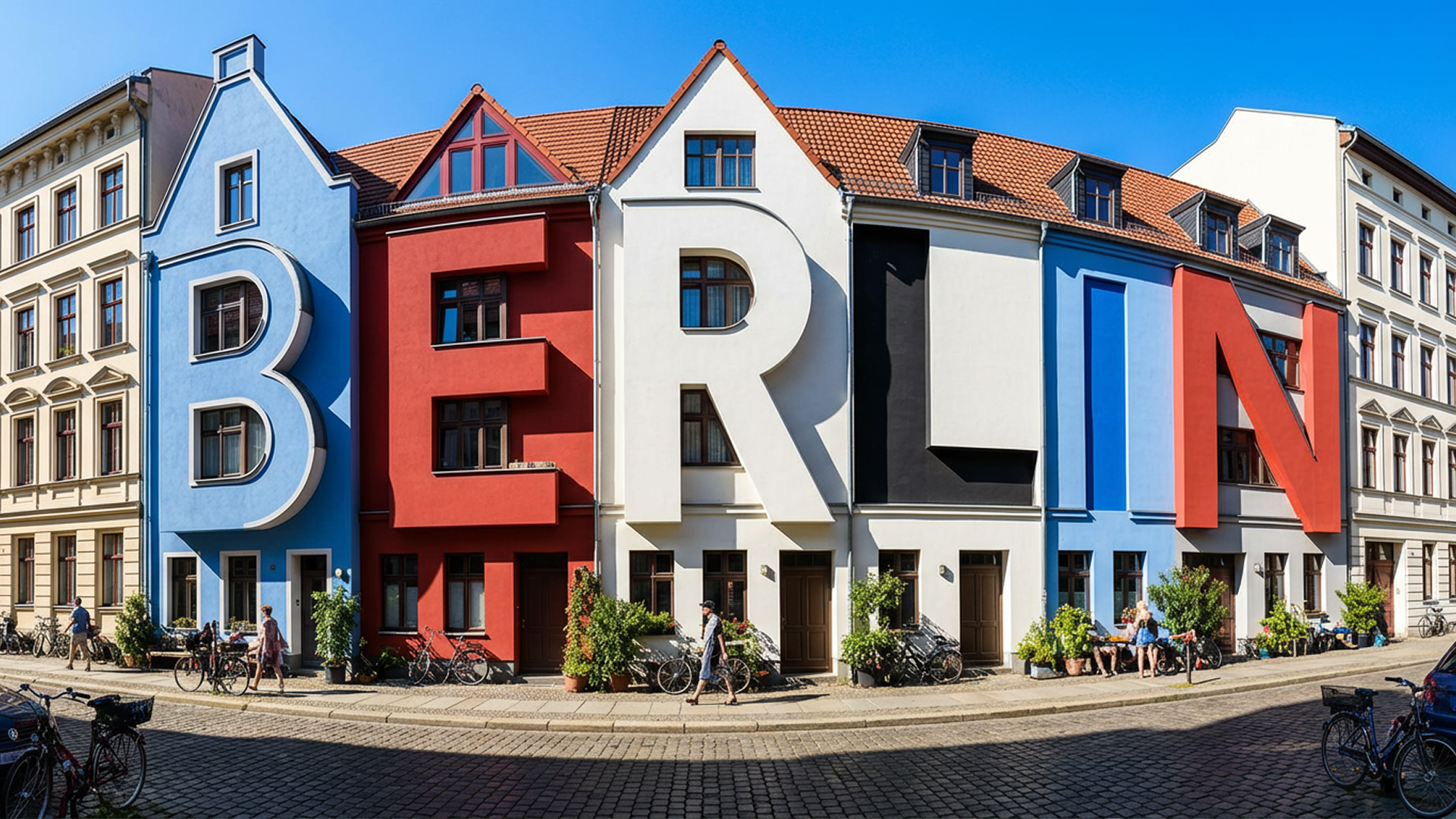
Source: Google, "Introducing Nano Banana Pro"
Prompt idea:
View of a cozy street in Berlin on a bright sunny day, stark shadows. The old houses are oddly shaped like letters that spell out "BERLIN." Colored in blue, red, white and black. The houses still look like houses and the resemblance to letters is subtle.
Why this works:
- the word is short
- the scene logic is very clear
- the prompt protects the illusion by saying the buildings should still read as houses
Takeaway:
If you want text embedded into architecture, objects, or landscapes, write both sides of the constraint: what the word should say and what the object should still remain.
Case 3: Ask for Typography as a Designed Object
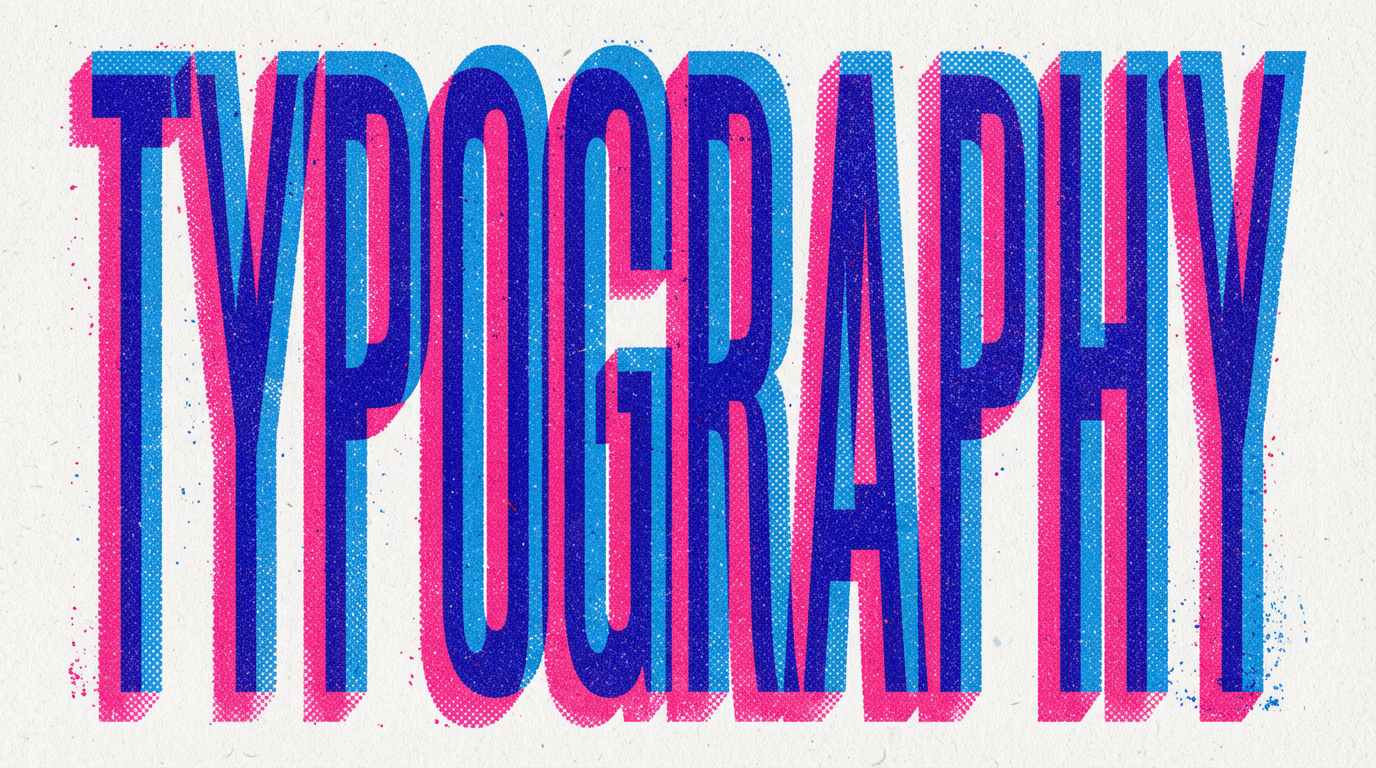
Source: Google, "Introducing Nano Banana Pro"
Prompt idea:
A vibrant, eye-catching "TYPOGRAPHY" design on a textured off-white background. The letters are bold, blocky, extra condensed and create a 3D effect with overlapping layers of bright blue and hot pink, each with a halftone dot pattern, evoking a retro print aesthetic. 16:9 aspect ratio.
Why this works:
- the requested word is short and central
- the visual treatment is specific: condensed letters, 3D overlap, halftone texture
- the prompt is really a design brief, not just a text request
Takeaway:
For posters, title cards, and headers, do not stop at the words themselves. Describe typography, texture, composition, and aspect ratio.
Case 4: Translate Packaging Text While Preserving Branding
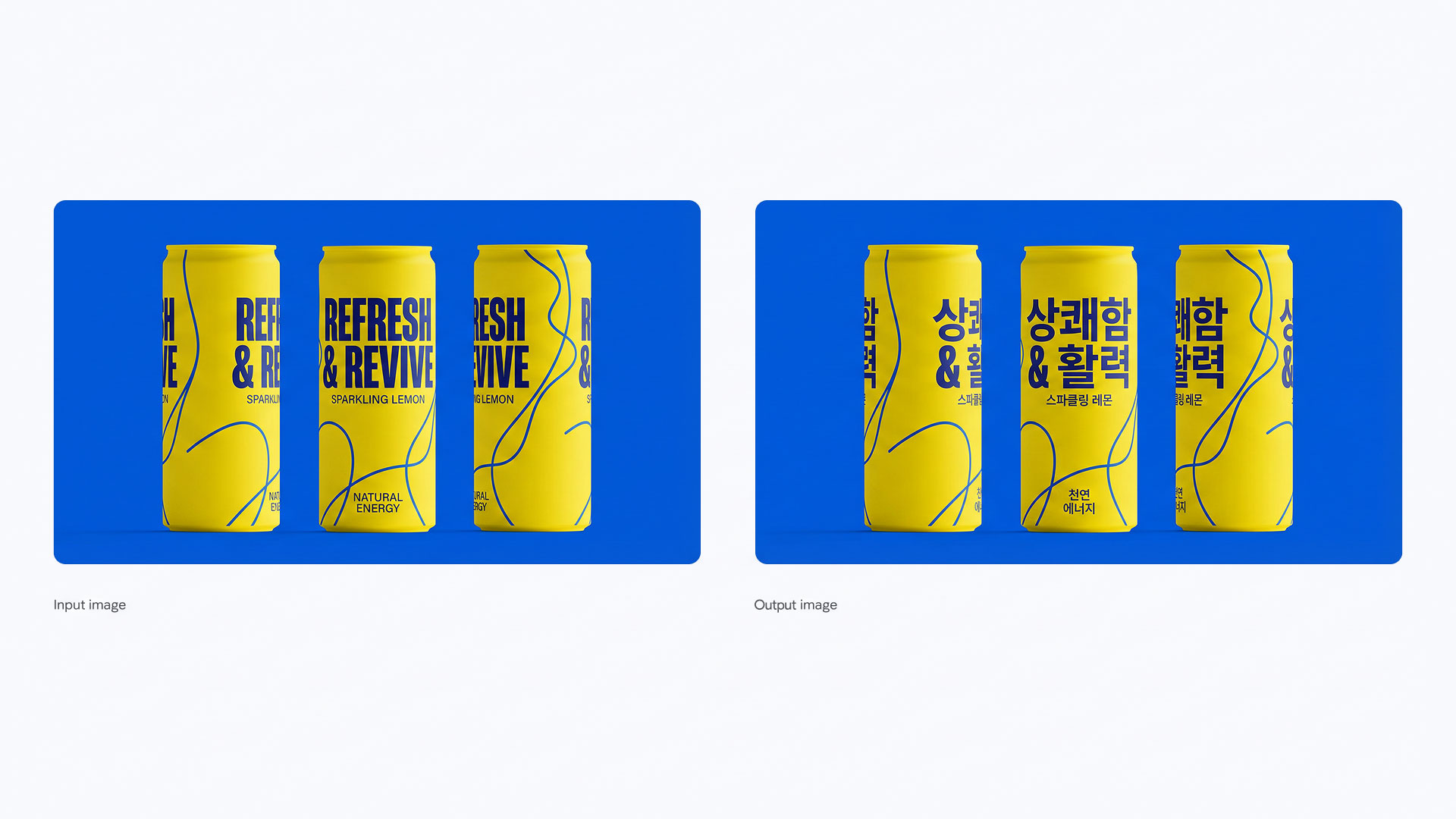
Source: Google, "Introducing Nano Banana Pro"
Prompt idea:
Translate all the English text on the three yellow and blue cans into Korean, while keeping everything else the same.
Why this works:
- the edit target is narrow
- the protected details are obvious: can shape, colors, layout, and branding
- the model does not need to redesign the whole image
Takeaway:
This is one of the strongest Nano Banana patterns: preserve layout, change language. If the task is localization, keep the prompt narrow and do not mix it with style changes.
Case 5: Build a Scene from Multiple Inputs Without Losing Order

Source: Google, "Introducing Nano Banana Pro"
Prompt idea:
Combine these images into one appropriately arranged cinematic image in 16:9 format and change the dress on the mannequin to the dress in the image.
Why this works:
- the scene is assembled from discrete source assets
- one transformation is clearly named: swap the dress
- the final target is also clear: cinematic composition in a fixed aspect ratio
Takeaway:
When a scene gets complicated, keep the prompt structured:
Combine these inputs into one scene. Keep [core subject] consistent. Replace [specific element]. Present it as [target composition].
That is usually more stable than one huge descriptive paragraph.
Case 6: Change Lighting Without Rebuilding the Whole Image
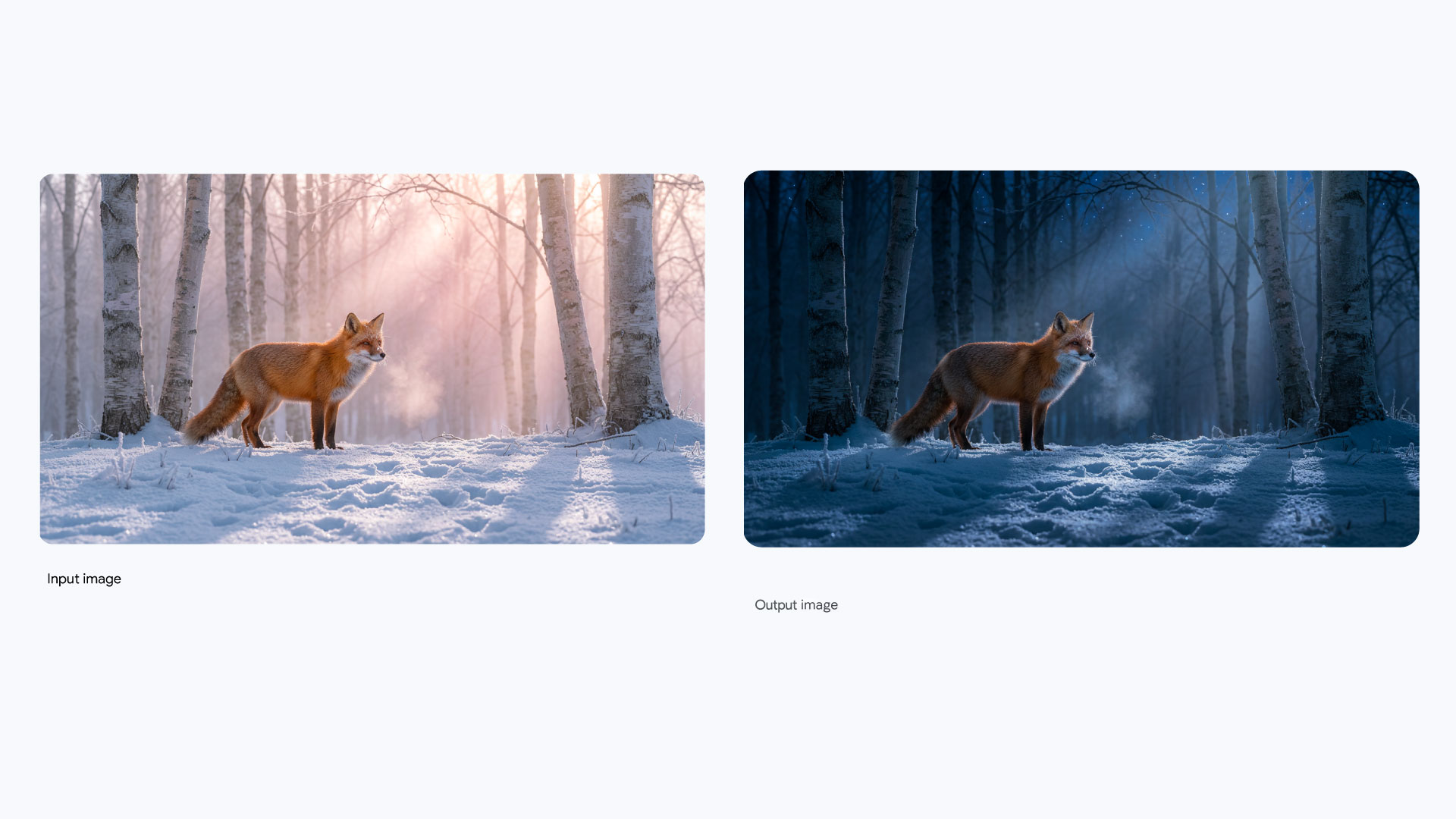
Source: Google, "Introducing Nano Banana Pro"
Prompt idea:
Turn this scene into nighttime.
Why this works:
- the request is simple
- the composition is already locked
- the edit changes mood and lighting, not subject identity
Takeaway:
Nano Banana is often strongest when the structural geometry stays fixed and only one visual layer changes: time of day, color grade, material, focus, or lighting.
Case 7: Push Drama with Localized Lighting
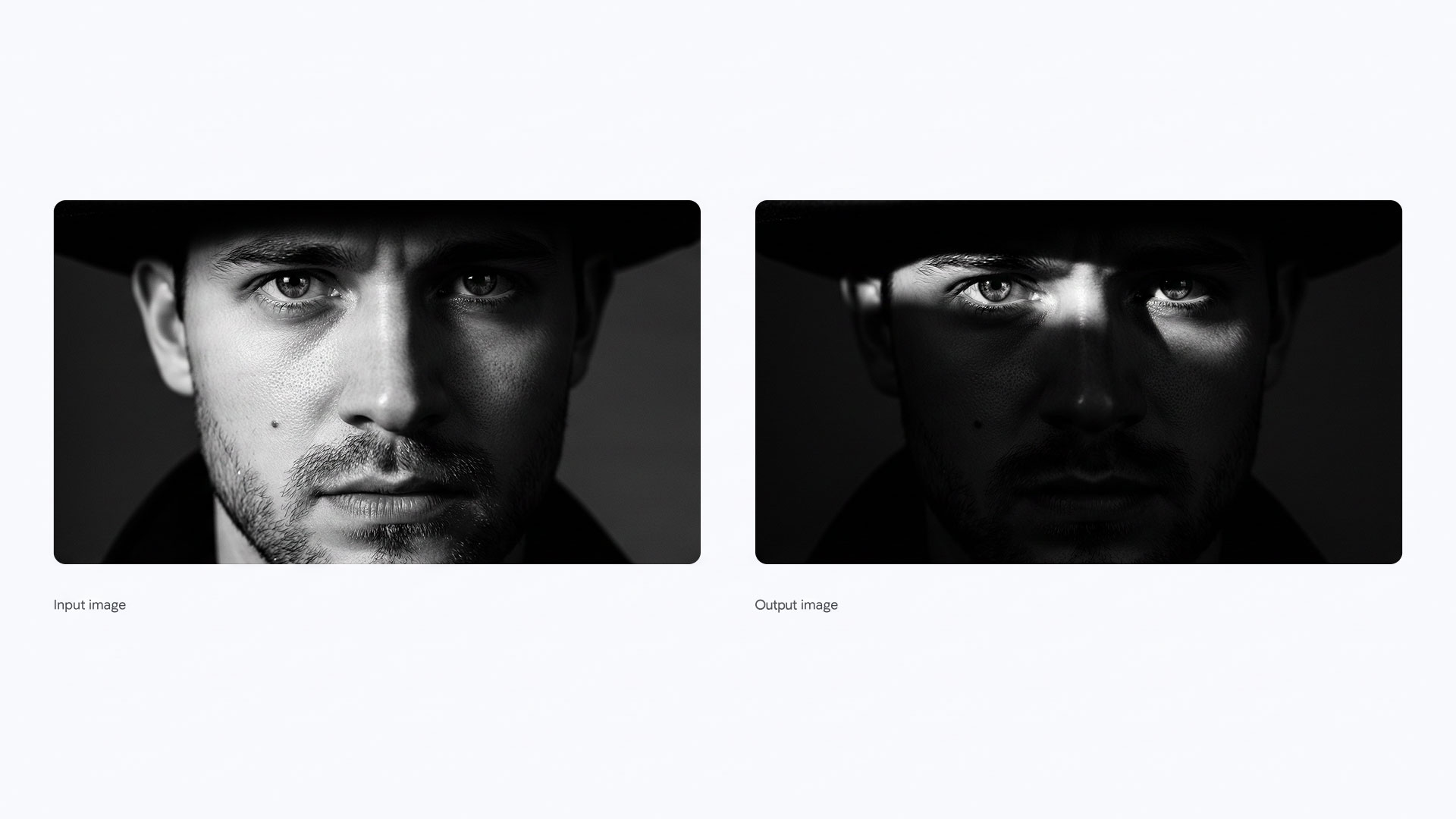
Source: Google, "Introducing Nano Banana Pro"
Prompt idea:
Generate an image with an intense chiaroscuro effect. The man should retain his original features and expression. Introduce harsh, directional light from above and slightly to the left, casting deep, defined shadows across the face. Only slivers of light should illuminate the eyes and cheekbones.
Why this works:
- the identity lock is explicit
- the lighting direction is explicit
- the emotional target comes from concrete light behavior, not vague words like "cinematic"
Takeaway:
For dramatic scene edits, "keep identity + define light source + define what remains visible" is a very strong formula.
What These Cases Teach About Text Rendering
Nano Banana is much better at text when you do these things:
- keep the words short
- put important text in quotation marks
- describe where the text should appear
- describe how the text should look
- protect layout when editing an existing design
Weak prompt:
make a cool poster with some text
Stronger prompt:
Create a 16:9 movie poster of a rainy cyberpunk street. Put the headline "URBAN EXPLORER" in large white sans-serif text across the top. Add a small tagline at the bottom. Keep the text sharp, legible, and high contrast.
The difference is not style. The difference is control.
What These Cases Teach About Complex Scene Edits
The same principle applies to multi-image and scene-heavy edits:
- lock what must survive
- name the specific element that should change
- state the target composition
- avoid stacking unrelated goals into one request
Weak prompt:
make this more cinematic, stylish, premium, dramatic, realistic, artistic
Stronger prompt:
Keep the subject identity unchanged. Replace the background with a desert fashion set. Combine the reference dress and props into one editorial scene. Use natural light and a 16:9 composition.
That tells the model what to preserve, what to change, and what final image you actually want.
A Prompt Formula That Travels Well
For text-heavy or scene-heavy Nano Banana tasks, this structure is usually reliable:
Keep [locked elements] unchanged. Change [specific editable elements]. Render the text as [wording + placement + style]. Present the result as [scene or format]. Do not alter [protected details].
Examples:
Keep the can shape, brand colors, and layout unchanged. Translate the visible English text into Korean. Keep the typography bold and legible. Do not alter the logo placement or illustration style.
Keep the person's identity unchanged. Replace the lighting with a high-contrast chiaroscuro setup from above-left. Keep the expression the same. Do not change facial proportions.
The 5 Most Common Mistakes
1. Asking for too much text
Nano Banana can handle text, but short copy is still safer than a dense paragraph.
2. Forgetting placement
"Add text" is weak. "Put the title at the top in bold condensed sans-serif" is much better.
3. Mixing localization with redesign
If you want to translate packaging, do not also ask for a new art direction in the same pass.
4. Not protecting the unchanged parts
If identity, logo, proportions, packaging shape, or composition matters, say so directly.
5. Treating scene edits like style filters
The more complex the scene, the more you need scene logic: who stays, what changes, what gets added, and what the final frame should feel like.
Quick Checklist
- Is the text short enough to render reliably?
- Did you specify wording, placement, and style?
- Did you state what must remain unchanged?
- Did you isolate the part of the scene that should change?
- Did you name the final format, such as poster, storyboard, product mockup, or editorial scene?
- Did you avoid stacking unrelated asks into one prompt?